
Ventra Investment Group · TradingView tools
If you can't identify the liquidity, you are the liquidity.
Ventra's TradingView tools visualise trend and market structure on your chart, so you can analyse price your own way. Learn to read them alongside our education community in Discord.

Products
Two tools. One way of reading the chart.
Both are in final testing and launching soon. Pricing and subscription terms will be published here before launch.
Ventra Lite
TradingView indicator
The core trend and structure view.
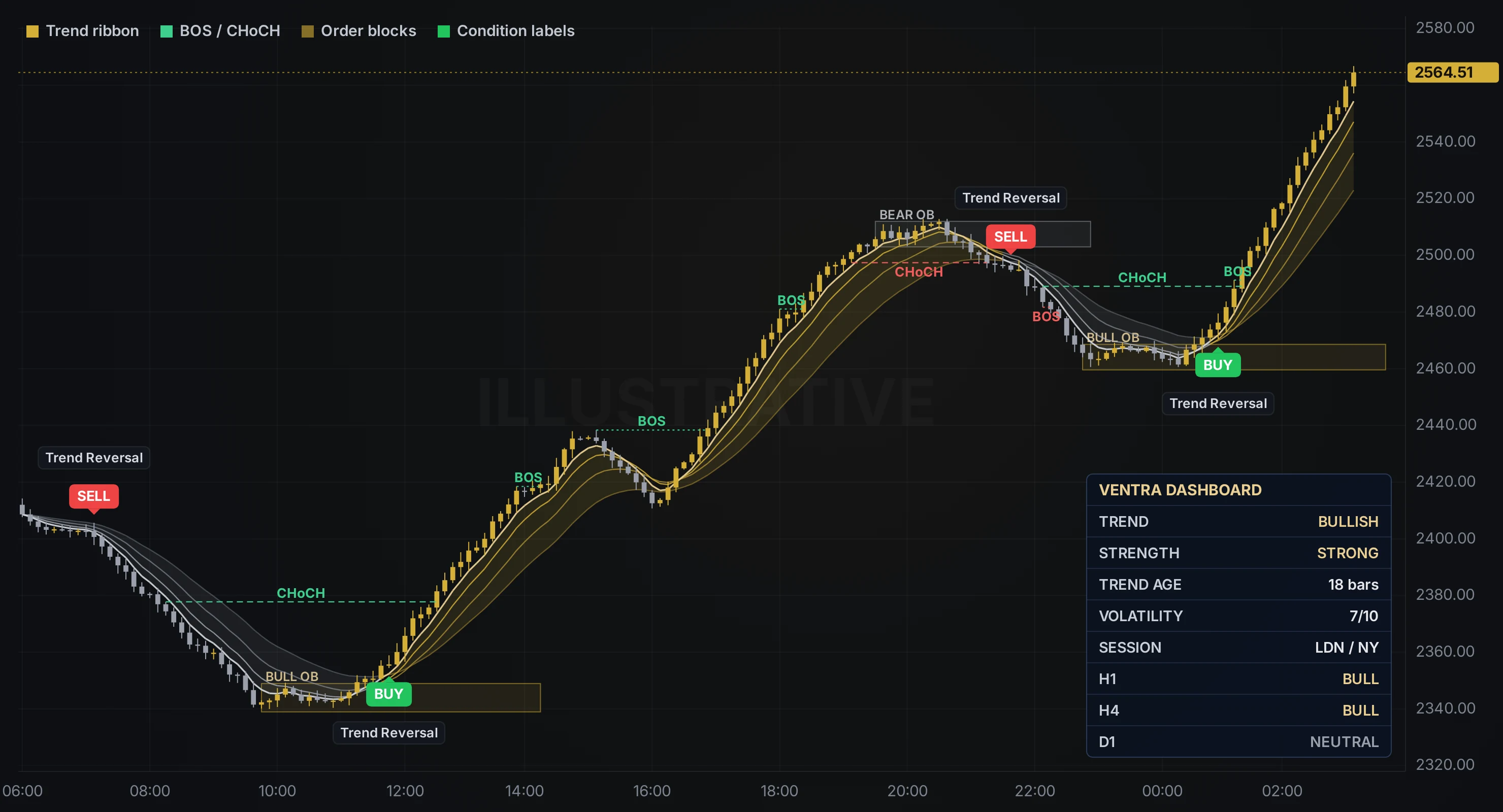
- Four-line trend ribbon: gold when bullish, silver when bearish
- Trend reversal labels when the ribbon flips
- BOS and CHoCH market-structure lines
- Access to the Ventra education Discord
Ventra Pro
TradingView indicator
Everything in Lite, plus:
- BUY / SELL labels on bars where the indicator's rules are met
- Order block zones
- Ventra dashboard: trend, strength, volatility, session and H1 / H4 / D1 bias
- TradingView alerts when the indicator's conditions are met
Prices in Australian dollars and include GST (A$24.99 + GST and A$49.99 + GST). Billed monthly through Stripe. Cancel anytime from your Indicator Hub; access continues until the end of the month you've paid for. Requires a TradingView account. Both tools only draw on your chart; you make your own trading decisions.
Requires a TradingView account. Prices will be in Australian dollars, GST inclusive, with the billing period, how to cancel and the refund policy shown here before launch. Both tools only draw on your chart; you make your own trading decisions.
Market sessions
Liquidity follows the clock
Volume moves with the world's trading centres. Watch Sydney, Tokyo, London and New York open and close, and see when their sessions overlap.
Sessions shown as 9-hour local business days (Sydney 7am–4pm, Tokyo 9am–6pm, London and New York 8am–5pm), adjusted for daylight saving. Closed on weekends.
The Ventra community
The tool draws the chart. The community helps you understand it.
Every subscription includes the Ventra Discord: an education community where we explain what the indicator is showing and why, and where members learn to read market structure for themselves. It's general education only. We don't give trade calls or personal advice.
Join our DiscordLive session breakdowns
Walk through the London and New York opens with the indicator on screen, explaining what each marking means.
Indicator lessons
Step-by-step lessons on reading the tool, from first install to understanding each feature.
Chart discussion
Share charts and discuss how the ribbon and structure lines read. General education, never personal advice.
First to hear
Updates, new features and announcements land in Discord before anywhere else.
Getting access
How access will work
Create your account
At launch, pick a subscription and pay securely through Stripe. You can cancel from your account at any time.
Give your TradingView username
Your account asks for it. That's the account we grant access to, so double-check the spelling.
Add it to your chart
Within 24 hours it appears under Indicators → Invite-only scripts, and your Discord invite is waiting in your Indicator Hub.
Questions
Before you subscribe
When do Ventra Lite and Ventra Pro launch?
Soon. Both are in final testing. Join the Discord or check back here; pricing and subscription terms will be published before launch.
Does it place trades for me?
No. Both tools only draw on your TradingView chart. They don't place, copy or manage trades, and nothing they show is a recommendation. You make your own decisions.
What do the BUY and SELL labels mean?
They mark the bars where the indicator's rules are met: a trend-ribbon flip together with a structure change. They describe what the chart is doing. They are not instructions or recommendations to trade.
Which markets does it work on?
Any symbol TradingView charts, including gold, indices, crypto and FX.
Do I need a paid TradingView plan?
No. Invite-only scripts work on free TradingView accounts. Paid plans give you more alerts and indicators per chart.
What's the difference between Lite and Pro?
Lite gives you the trend ribbon, trend reversal labels and BOS / CHoCH structure lines. Pro adds BUY / SELL condition labels, order block zones, the Ventra dashboard and TradingView alerts.
How do I cancel?
Cancel anytime from your Indicator Hub. Access continues to the end of the period you've paid for.
How do I get support?
Email us with your TradingView username: admin@ventrainvestmentgroup.com
Important information
General advice warning. Ventra Investment Group Pty Ltd does not hold an Australian Financial Services Licence. All content and tools are for general information and educational purposes only and do not constitute financial product advice. They do not take into account your objectives, financial situation or needs. Consider seeking independent advice before trading.
Risk warning. Trading CFDs, forex, commodities and crypto involves a high risk of loss due to leverage. Most retail accounts lose money. Only trade with money you can afford to lose.
Past performance is not indicative of future results.